Dashboard
Daily numbers, at a glance.
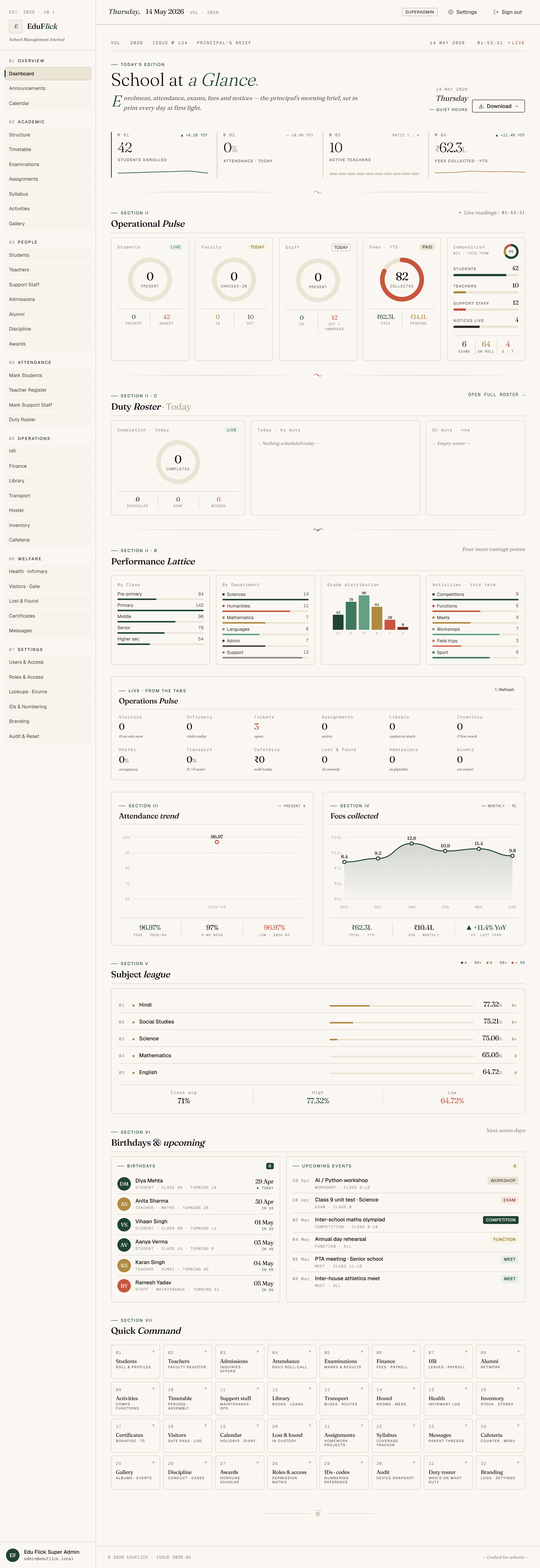
The first screen every staff member sees, personalised by role. Principal sees school-wide. Teacher sees their classes. Parent sees their child.
Live numbers — no manual refresh, no end-of-day reports waiting in inboxes. The dashboard is the running pulse of the school.
What we ship today
Today · live
- Today's attendance percentage — students and staff.
- Pending admissions, recent announcements, upcoming exams.
- Quick links to the most frequently used screens.
- Personalised by role: Principal sees school-wide, Teacher sees their classes only.
- Live counts — no manual refresh required.
- Cards are role-aware: a Teacher never sees finance widgets.
Tailored to your school
Mould it
- Re-order, hide, or pin cards per role. Build a Principal dashboard that opens straight on the metrics they actually check first.
- Add custom widgets — fee collection, mid-day meal headcount, transport availability, anything you already track.
- Drill-down behaviour configurable: tap a card to navigate, or tap to open a filtered report you defined.
- Branding inherits from Settings — your colours, your typography accents.
Where AI takes this
Phase 4 · AI
- "What needs my attention today?" — Edu Flick AI surfaces the three things this role should look at first.
- Attendance & academic risk indicators — students whose trends have dipped this week.
- Smart search bar: natural-language queries scoped by RBAC.
Who uses it
All staff roles land here after sign-in.